Before You Hire an Accessibility Provider, Read This
Not everyone offering accessibility services is acting in good faith or delivering quality work.
Hiring the wrong person or a company can lead to:
- legal problems (mainly in the United States),
- wasting a lot of money on poor work,
- paying for fake or useless solutions like accessibility overlays,
- and not helping disabled people enough or not at all.
Accessibility vs. Legal Compliance
If you care about making your website genuinely accessible for disabled people, remember that WCAG compliance alone (WCAG being the main, kinda official guidelines for making web accessible) is not always enough. Website can pass all the WCAG checks and still be hard to use for people. That’s why your website should be tested with real disabled people.
If your main goal is legal compliance, then make sure to:
- check your local accessibility laws,
- talk to a lawyer if needed, to understand which standards apply in your country or industry (it differs),
- and not believe in quick accessibility solutions.
Important things to know about accessibility
1. Automated tools catch only some problems
Automated accessibility tools - the ones you find online - are useful, but they cannot find everything. Many problems can only be found through manual testing like:
- keyboard testing,
- screen reader testing,
- and getting real human feedback.
2. Accessibility is not a one-time task
One audit or one round of fixes will not keep your website accessible forever. New content, updates, plugins, or redesigns can create new accessibility problems.
3. Accessibility overlays are often a bad solution
Some companies sell accessibility overlays, claiming they instantly fix the accessibility issues.
In many cases, they don't fix the website, they even make things worse. And create additional barriers for disabled users.
Also they don't protect you for lawsuits.
Stay away from providers that push overlays as their main solution.
4. WCAG compliance doesn’t always mean good accessibility
Passing WCAG checks doesn’t guarantee a good user experience. (It’s a great starting point though!) People with disabilities are not the same, some may have needs that are beyond the WCAG rules.
Quick accessibility tests you can do yourself
A simple way to judge an accessibility provider is to look at:
- their own website,
- or websites they say they worked on.
Choose one and do following investigation :-)
Keyboard test
You need to be on your desktop computer or laptop for this one. Open the site and use only Tab, Enter, and arrows keys to navigate through the page.
- Press Tab to move forward through all clickable elements.
- Press Shift+Tab to move backward.
- Press Enter or Space on buttons and checkboxes to activate them.
- Use arrow keys in menus, dropdowns, and carousels.
You should be able to tell where you currently are, each focused element should be clearly highlighted. Focus is where the keyboard is currently at — the item that will act if you press Enter instead of clicking on it.
And you must be able to get everywhere on the page without getting stuck.
If you can't tell what's currently focused, then people relying on keyboard instead of a mouse can't either.
200% zoom test
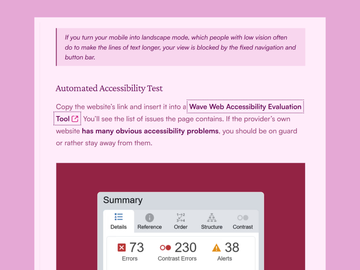
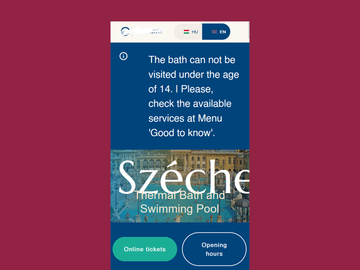
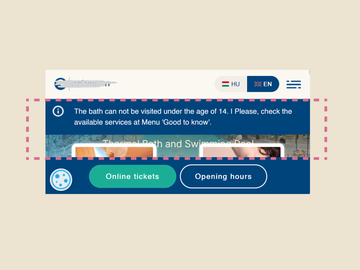
Go to your browser or device settings and increase the font size to 200%. Or select a value that is higher than your current one. Then browse the site. Is it broken or the font size stayed the same? They didn’t think of accessibility.
Automated accessibility test
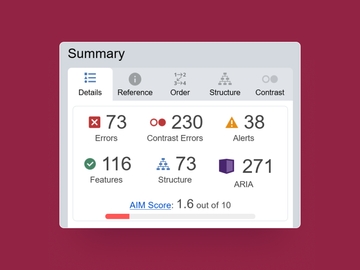
Copy the website’s link and insert it into a Wave Web Accessibility Evaluation Tool. You’ll see the list of issues that page contains. If the provider’s own website has many accessibility problems, you should be on guard or rather stay away from them.
Keep in mind that websites may have few accessibility errors simply because:
- accessibility work takes time,
- site owner had a limited budget to cover all the issues,
- or some issues are planned to be fixed later.
Good and bad signs of quality
Green flags
Good accessibility providers usually:
- understand both WCAG rules and real usability,
- explain problems clearly,
- focus on the most important issues first,
- work well with developers and designers,
- do manual testing, not only automated scans,
- test with assistive technologies,
- involve disabled users in testing.
Red flags
Be careful if a provider:
- promises 100% compliance,
- sells accessibility overlays as the main solution,
- sells AI-powered accessibility solutions,
- tries to scare you with lawsuits or legal threats,
- relies only on automated tools,
- cannot clearly explain how they test,
- offers audits that are unrealistically cheap or fast,
- gives you a long list of accessibility problems without prioritisation,
- or doesn’t warn you about accessibility being more than a one-time thing certification.
Web accessibility is part of good design
Accessible websites are easier to use, clearer to understand, and more comfortable for everyone. No doubt.
Need help improving your website's accessibility? I’m here to help.
Contact meSummary
Accessibility is about helping real people use your website. If something sounds too easy, too fast, or too good to be true, it probably is.